Signal interoperability
As described in the signals page, AICA signals make it easy to exchange Cartesian and joint state variables in an internally consistent way. In components, state signals are automatically converted into smart data classes that provide useful functions for conversions, transformations and other manipulations.
Even though there is no official standard, there are a few signal types that are very commonly used in ROS. For ease of interoperability, AICA Core includes several components that translate AICA signals to common ROS messages and back. These components can be especially valuable when porting existing ROS nodes into AICA Studio using the Component SDK or when communicating with ROS nodes outside the AICA System.
AICA signals to common ROS messages
AICA state signals carrying Cartesian or joint space information can be converted into common ROS message types using the following components:
| Component name | Input signal type | Output message type |
|---|---|---|
| Cartesian Signal to Pose Stamped Message | Cartesian state or pose | geometry_msgs::msg::PoseStamped |
| Cartesian Signal to Twist Stamped Message | Cartesian state or twist | geometry_msgs::msg::TwistStamped |
| Cartesian Signal to Wrench Stamped Message | Cartesian state or wrench | geometry_msgs::msg::WrenchStamped |
| Joint Signal To Joint State Message | Joint state, positions, velocities or torques | sensor_msgs::msg::JointState |
Common ROS messages to AICA signals
Common ROS message types carrying Cartesian or joint space information can be converted back into AICA state signals using the following components:
| Component name | Input message type | Output signal type |
|---|---|---|
| Pose Stamped Message to Cartesian Signal | geometry_msgs::msg::PoseStamped | Cartesian state containing pose information |
| Twist Stamped Message to Cartesian Signal | geometry_msgs::msg::TwistStamped | Cartesian state containing twist information |
| Wrench Stamped Message to Cartesian Signal | geometry_msgs::msg::WrenchStamped | Cartesian state containing wrench information |
| Joint State Message to Joint Signal | sensor_msgs::msg::JointState | Joint state |
Behavior
All of these components are single-input single-output blocks. Each time a new message is received, it is translated and
immediately published. For that reason, the rate parameter doesn't affect the behavior of these components.
AICA Signal to ROS message example
This example uses the Joint Signal To Joint State Message component to translate the joint state output from the
hardware interface to a sensor_msgs::msg::JointState message and the Cartesian Signal to Pose Stamped Message
component to translate the Cartesian state output to a geometry_msgs::msg::PoseStamped message.
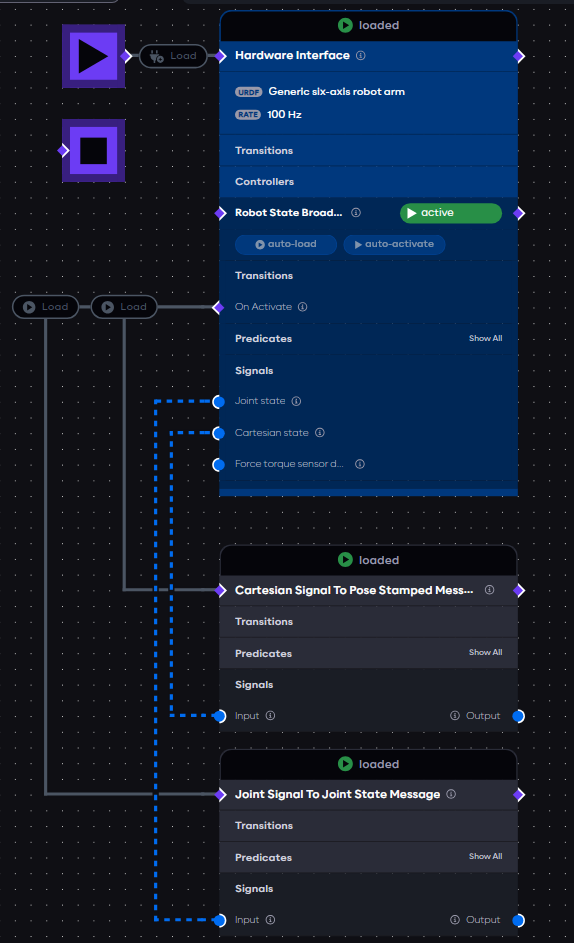
With the application loaded and started, the two components will publish the converted message on their output signal each time a new message is received from the hardware interface. A jsonified version of those messages can be observed in the Live Data tab on the right panel.
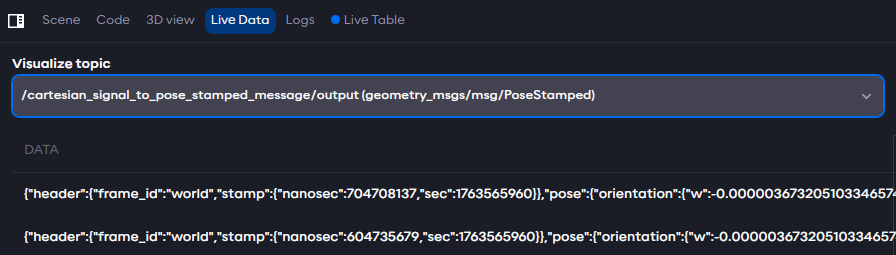
With content:
{
  "header": { "stamp": { "sec": 1749019367, "nanosec": 736960997 }, "frame_id": "world" },
  "pose": {
    "position": { "x": 0.37246365888399174, "y": 0.048146868357851064, "z": 0.4299999920960212 },
    "orientation": {
      "x": 0.7073880448768991,
      "y": 0.7068251811053661,
      "z": 8.971607761328708e-7,
      "w": -0.0005633114591638605
    }
  }
}

With content:
{
  "header": { "stamp": { "sec": 1749019239, "nanosec": 277825301 }, "frame_id": "" },
  "name": ["joint_1", "joint_2", "joint_3", "joint_4", "joint_5", "joint_6"],
  "position": [0, 0, 0, 0, 0, 0],
  "velocity": [0, 0, 0, 0, 0, 0],
  "effort": [0, 0, 0, 0, 0, 0]
}
Application YAML
schema: 2-0-6
dependencies:
  core: v5.0.0
on_start:
  load:
    hardware: hardware
components:
  joint_signal_to_joint_state_message:
    component: aica_core_components::ros::JointSignalToJointStateMsg
    display_name: Joint Signal To Joint State Message
    inputs:
      input: /hardware/robot_state_broadcaster/joint_state
  cartesian_signal_to_pose_stamped_message:
    component: aica_core_components::ros::CartesianSignalToPoseStampedMsg
    display_name: Cartesian Signal To Pose Stamped Message
    inputs:
      input: /hardware/robot_state_broadcaster/cartesian_state
hardware:
  hardware:
    display_name: Hardware Interface
    urdf: Generic six-axis robot arm
    rate: 100
    events:
      transitions:
        on_load:
          load:
            controller: robot_state_broadcaster
            hardware: hardware
    controllers:
      robot_state_broadcaster:
        plugin: aica_core_controllers/RobotStateBroadcaster
        outputs:
          joint_state: /hardware/robot_state_broadcaster/joint_state
          cartesian_state: /hardware/robot_state_broadcaster/cartesian_state
        events:
          transitions:
            on_load:
              switch_controllers:
                hardware: hardware
                activate: robot_state_broadcaster
            on_activate:
              load:
                - component: cartesian_signal_to_pose_stamped_message
                - component: joint_signal_to_joint_state_message
graph:
  positions:
    on_start:
      x: 0
      y: -20
    components:
      joint_signal_to_joint_state_message:
        x: 200
        y: 920
      cartesian_signal_to_pose_stamped_message:
        x: 200
        y: 660
    hardware:
      hardware:
        x: 200
        y: -20
  edges:
    hardware_hardware_robot_state_broadcaster_on_activate_cartesian_signal_to_pose_stamped_message_cartesian_signal_to_pose_stamped_message:
      path:
        - x: 80
          y: 360
        - x: 80
          y: 720
    hardware_hardware_robot_state_broadcaster_cartesian_state_cartesian_signal_to_pose_stamped_message_input:
      path:
        - x: 140
          y: 520
        - x: 140
          y: 880
    hardware_hardware_robot_state_broadcaster_on_activate_joint_signal_to_joint_state_message_joint_signal_to_joint_state_message:
      path:
        - x: -20
          y: 360
        - x: -20
          y: 980
    hardware_hardware_robot_state_broadcaster_joint_state_joint_signal_to_joint_state_message_input:
      path:
        - x: 120
          y: 480
        - x: 120
          y: 1140
ROS message to AICA Signal example
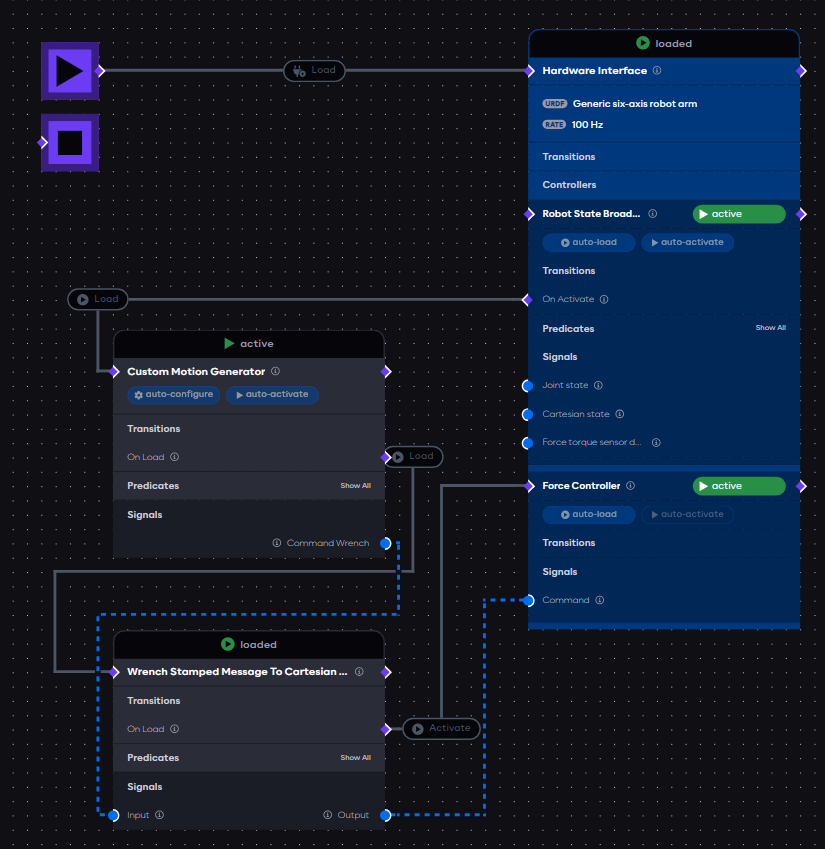
Mirroring the first example, the following application uses the Wrench Stamped Message To Cartesian Signal component
to translate a geometry_msgs::msg::WrenchStamped from some custom component to a Cartesian signal that is connected to
the force controller of the hardware interface.
The custom component is just an example placeholder for any implementation that has a ROS standard message output, which might occur when porting existing ROS nodes into AICA Studio using the AICA SDK.
Application YAML
schema: 2-0-6
dependencies:
  core: v5.0.0
on_start:
  load:
    hardware: hardware
components:
  wrench_stamped_message_to_cartesian_signal:
    component: aica_core_components::ros::WrenchStampedMsgToCartesianSignal
    display_name: Wrench Stamped Message To Cartesian Signal
    events:
      transitions:
        on_load:
          switch_controllers:
            hardware: hardware
            activate: force_controller
    inputs:
      input: /custom_motion_generator/command
    outputs:
      output: /wrench_stamped_message_to_cartesian_signal/output
  custom_motion_generator:
    component: template_component_package::PyComponent
    display_name: Custom Motion Generator
    events:
      transitions:
        on_configure:
          lifecycle:
            component: custom_motion_generator
            transition: activate
        on_load:
          lifecycle:
            component: custom_motion_generator
            transition: configure
          load:
            component: wrench_stamped_message_to_cartesian_signal
    outputs:
      command: /custom_motion_generator/command
hardware:
  hardware:
    display_name: Hardware Interface
    urdf: Generic six-axis robot arm
    rate: 100
    events:
      transitions:
        on_load:
          load:
            - controller: robot_state_broadcaster
              hardware: hardware
            - controller: force_controller
              hardware: hardware
    controllers:
      robot_state_broadcaster:
        plugin: aica_core_controllers/RobotStateBroadcaster
        events:
          transitions:
            on_load:
              switch_controllers:
                hardware: hardware
                activate: robot_state_broadcaster
            on_activate:
              load:
                component: custom_motion_generator
      force_controller:
        plugin: aica_core_controllers/effort/ForceController
        parameters:
          force_limit:
            value:
              - 20
              - 20
              - 20
              - 2
              - 2
              - 2
            type: vector
        inputs:
          command: /wrench_stamped_message_to_cartesian_signal/output
graph:
  positions:
    on_start:
      x: 0
      y: -20
    stop:
      x: 0
      y: 80
    components:
      wrench_stamped_message_to_cartesian_signal:
        x: 100
        y: 820
      custom_motion_generator:
        x: 100
        y: 400
    hardware:
      hardware:
        x: 680
        y: -20
  edges:
    wrench_stamped_message_to_cartesian_signal_on_load_hardware_hardware_force_controller:
      path:
        - x: 560
          y: 960
        - x: 560
          y: 620
    custom_motion_generator_on_load_wrench_stamped_message_to_cartesian_signal_wrench_stamped_message_to_cartesian_signal:
      path:
        - x: 540
          y: 580
        - x: 540
          y: 760
        - x: 0
          y: 760
        - x: 0
          y: 880
    hardware_hardware_robot_state_broadcaster_on_activate_custom_motion_generator_custom_motion_generator:
      path:
        - x: 80
          y: 360
        - x: 80
          y: 460
    custom_motion_generator_target_pose_wrench_stamped_message_to_cartesian_signal_input:
      path:
        - x: 500
          y: 700
        - x: 500
          y: 800
        - x: 80
          y: 800
        - x: 80
          y: 1080
    wrench_stamped_message_to_cartesian_signal_output_hardware_hardware_force_controller_command:
      path:
        - x: 620
          y: 1080
        - x: 620
          y: 780